This process is used to add product highlights, promotional text or a warning to a catalogue product with a BBS product code or a BBS-only product (store product).
Note: Catalogue-only products cannot be maintained in Product Masterfile Maintenance.
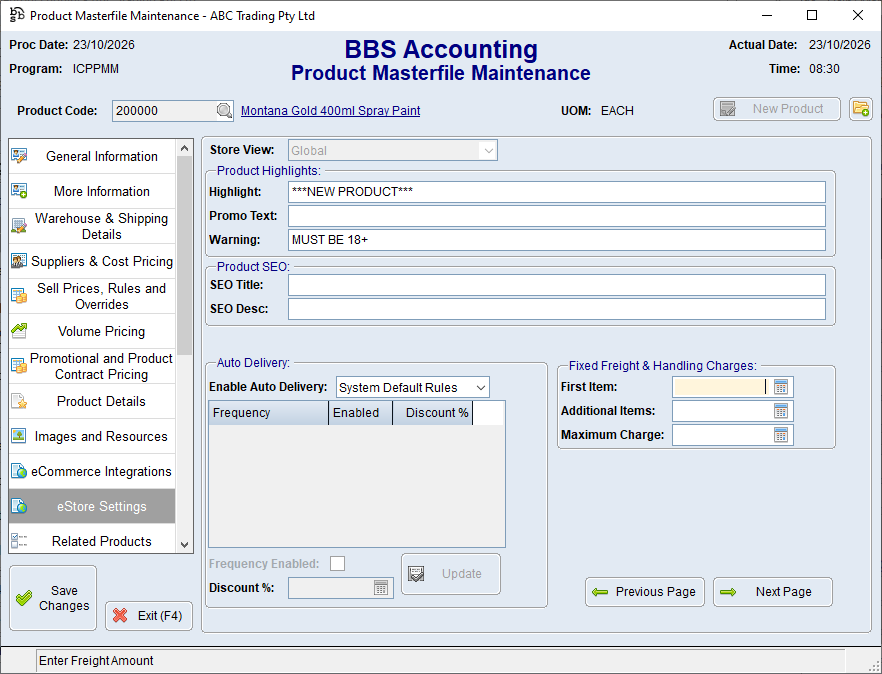

1.Open the product in Product Masterfile Maintenance. 2.Select eStore Settings. 3.Click Next Page to display Page 2. 4.If applicable, select the required Store View. 5.Enter the required text in one or more of these fields: oHighlight - A short product feature or selling point. oPromo Text - Promotional wording for the product. oWarning - An important customer notice associated with the product. 6.If required, maintain SEO Title and SEO Desc. 7.Save the product.
Keep each item concise and customer-facing. Do not use a warning field as a substitute for product safety or compliance information that belongs in the maintained product content. |
