This process is used to add product images and online resources to a catalogue product with a BBS product code or a BBS-only product (store product).
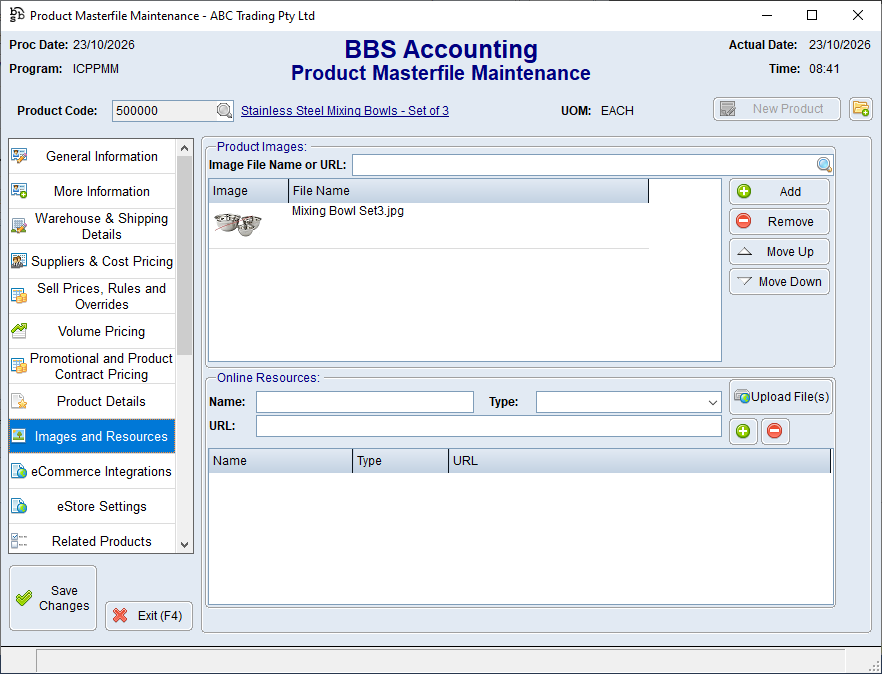
 Add and reorder product images
1.Open the product in Product Masterfile Maintenance. 2.Select Images and Resources. 3.In the Image File Name or URL field, enter a supported image URL or click 4.Click Add. 5.Repeat for additional images. 6.Users can select an image and use the Move Up or Move Down buttons to change the images display order. 7.To remove an image from a product, select the image in the list box and click Remove. This removes the association; it does not delete the underlying image file. 8.Save the product. |
 to search for the image file.
1.In the Online Resources section, enter the customer-facing Name. 2.Select the Type of resource: Document, Webpage, Image or Other. 3.Enter the URL, or click Upload File(s) where that facility is enabled. 4.Click the to add the online resource. 5.Repeat for other resources and save. |
