This section of the Quick Reference Guide provides instructions on how to perform the most common functions required to manage your BBS eStore from within BBS.

•Maintain products, customers, web logins, categories and product ranges in BBS, not directly in the eStore administration website. Changes made directly in the eStore administration website may be overwritten by the next BBS upload. •Changes saved against an individual product, customer or web login - including changes to favourites, contract prices and customer visibility settings - are automatically scheduled for upload. Manual uploads are not normally required. •Changes to eStore settings in e-Store Settings Maintenance will only be picked up when a full scan is performed, once every four hours. •Use the following product types consistently when deciding which screen and product code to use:
Important: Always check whether a catalogue product has a linked BBS product code before changing its visibility settings. This determines which settings apply.
Catalogue-wide rules and broader changes may take longer to appear in the eStore than individual product or customer changes.
|
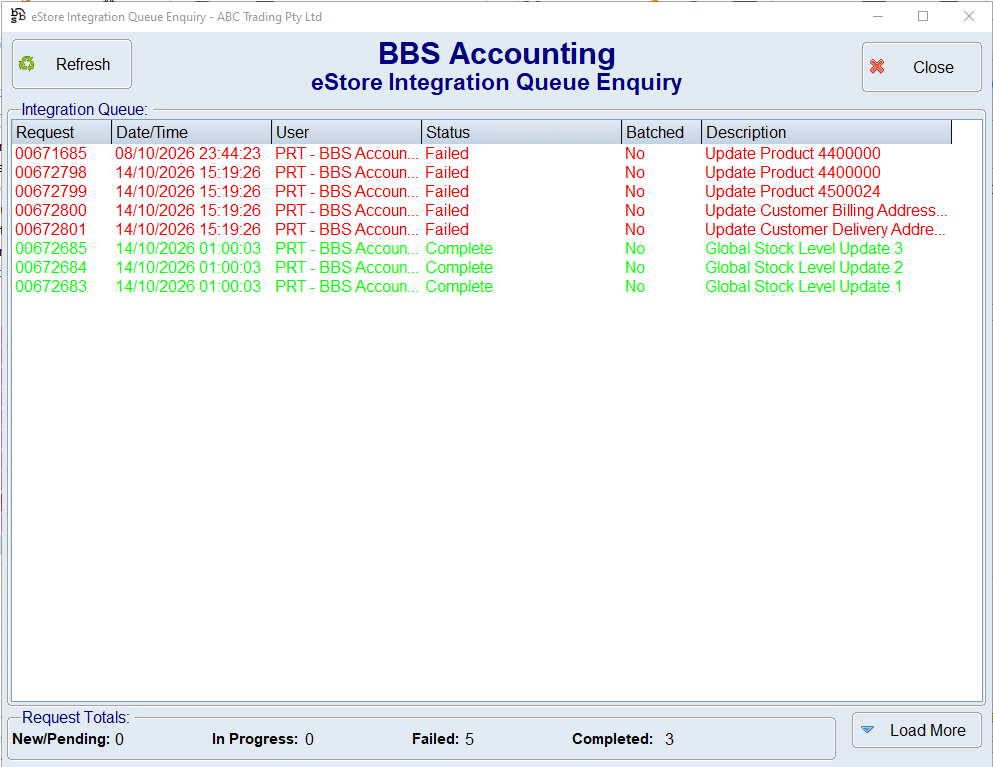
All requests to send data to the eStore from BBS pass through the eStore Integration Queue.
If data isn't appearing on the eStore as quickly as expected, you can view the eStore Integration Queue Enquiry to see whether eStore uploads are waiting, being processed, completed or have failed.
|
 WARNING:
