This process is used to override the eStore category for a catalogue product with a BBS product code, or a BBS-only product (store product).
Note: It does not apply to a catalogue-only product.
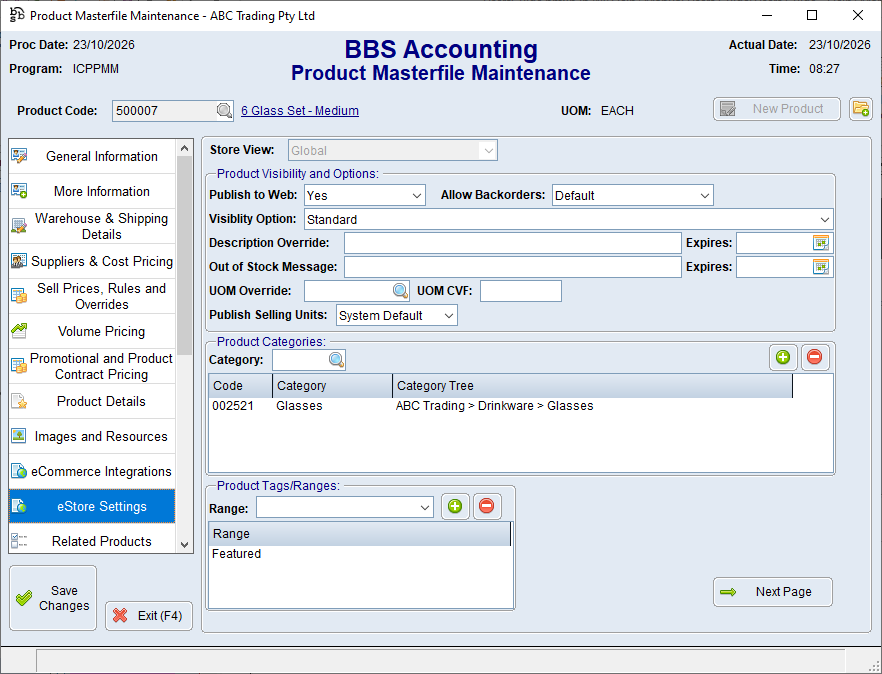

1.Open the product in Product Masterfile Maintenance. 2.Select the eStore Settings tab. 3.If applicable, select the required Store View. 4.Under Product Categories, enter eStore Category or click 5.Click to add. 6.Repeat Steps 4–5 if the product should appear in more than one category. 7.Save the product. |
 to search.
1.Select the category in the Product Categories list. 2.Click to delete. 3.Save the product.
For a catalogue product with a BBS product code, leaving the Product Categories list blank allows the mapped catalogue category to be used. For a BBS-only product (store product), keep at least one suitable eStore category assigned. |
