Use the Visibility Option in Product Masterfile Maintenance to control how the eStore treats a product while it is being sold out.
This process applies to a catalogue product with a BBS product code or a BBS-only product (store product). It does not apply to a catalogue-only product.
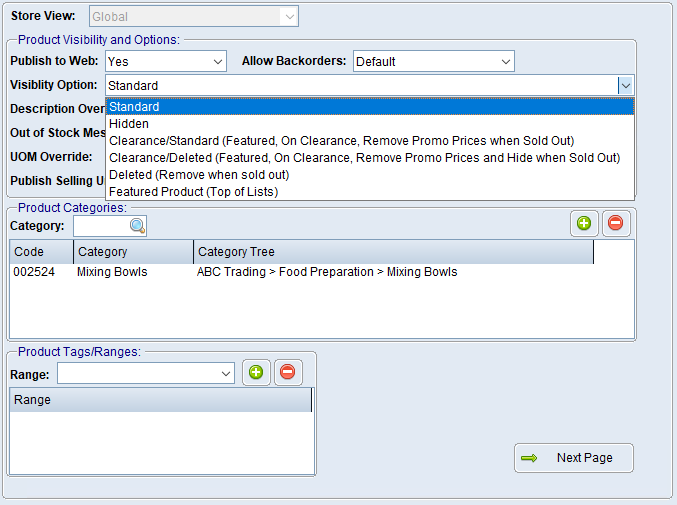

1.Navigate to Product Masterfile Maintenance. 2.Enter or look up the required product. 3.Select the eStore Settings tab. 4.Ensure Publish to Web is set appropriately. 5.Select the required Visibility Option: oClearance/Standard (Featured, On Clearance, Remove Promo Prices when Sold Out) displays the product as featured and on clearance. When stock is sold out, BBS expires current promotional prices and changes the product back to Standard. oClearance/Deleted (Featured, On Clearance, Remove Promo Prices and Hide when Sold Out) displays the product as featured and on clearance. When stock is sold out, BBS expires current promotional prices and changes the product to Deleted. oDeleted (Remove when sold out) continues displaying the product until its available quantity is sold, then removes it from the eStore. oFeatured Product (Top of Lists) keeps the product active and moves it towards the top of applicable category and search-result lists. It does not place the product on clearance. 6.If required, maintain the promotional price using the normal BBS promotional-pricing process. 7.Save the product. |
Use a clearance option when the product should be visibly promoted as clearance. Do not use clearance merely because a product has a promotional price.
The system settings can disable backorders and display an “Only xxx Left” message for discontinued or clearance products. Please refer to eStore Setting Maintenance - Product Settings Tab for more information.
Allow Backorders on the product is an individual override. Leave it at Default unless the product needs to behave differently from the system rules. |
