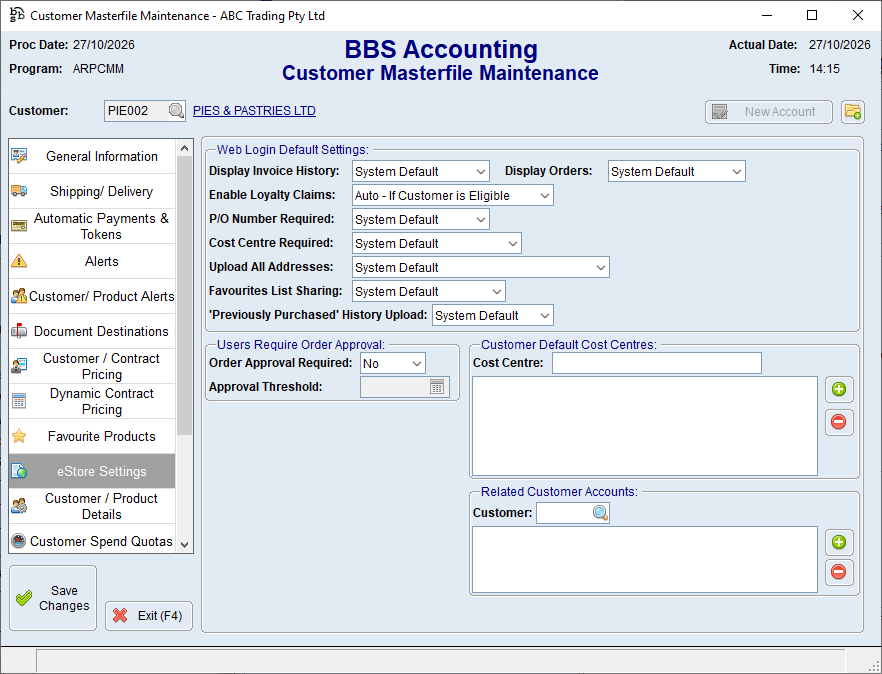
This process is used to setup and maintain order approval settings at a customer-level, which provide the default values for all web logins linked to the customer.
Individual web login settings can be configured to override these defaults where required.
Order approval requires both an approval setting (below) and a relationship between the ordering user and an approver (please refer to Maintain Order Approvers for more information).
 Set the customer default Order Approval settings
1.Navigate to Customer Masterfile Maintenance for the required customer. 2.Select the eStore Settings tab. 3.Set Order Approval Required to Yes or No. 4.When approval is required, enter the customer approval threshold amount. 5.Click Save Changes. 6.Assign approvers to each individual web login using the Maintain Order Approvers process.
|
Override the Order Approval settings for one login
1.Open eStore Web Login Maintenance and select the web login. 2.Set Order Approval Required to one of the following: •Customer Default •Yes - Customer Default Amount •Yes - User Specific Amount •No 3.If Yes - User Specific Amount is selected, enter the login's approval amount. 4.Click Save. 5.Assign approvers to each individual web login using the Maintain Order Approvers process.
eStore Web Login Maintenance Screen |
